Competitor Review Analysis Report Template (Free, Filled In)
I built a free template for review evidence: theme, count, n, sources, dates, a linked quote and a may-be-fixed flag. Filled in from 261 complaints.
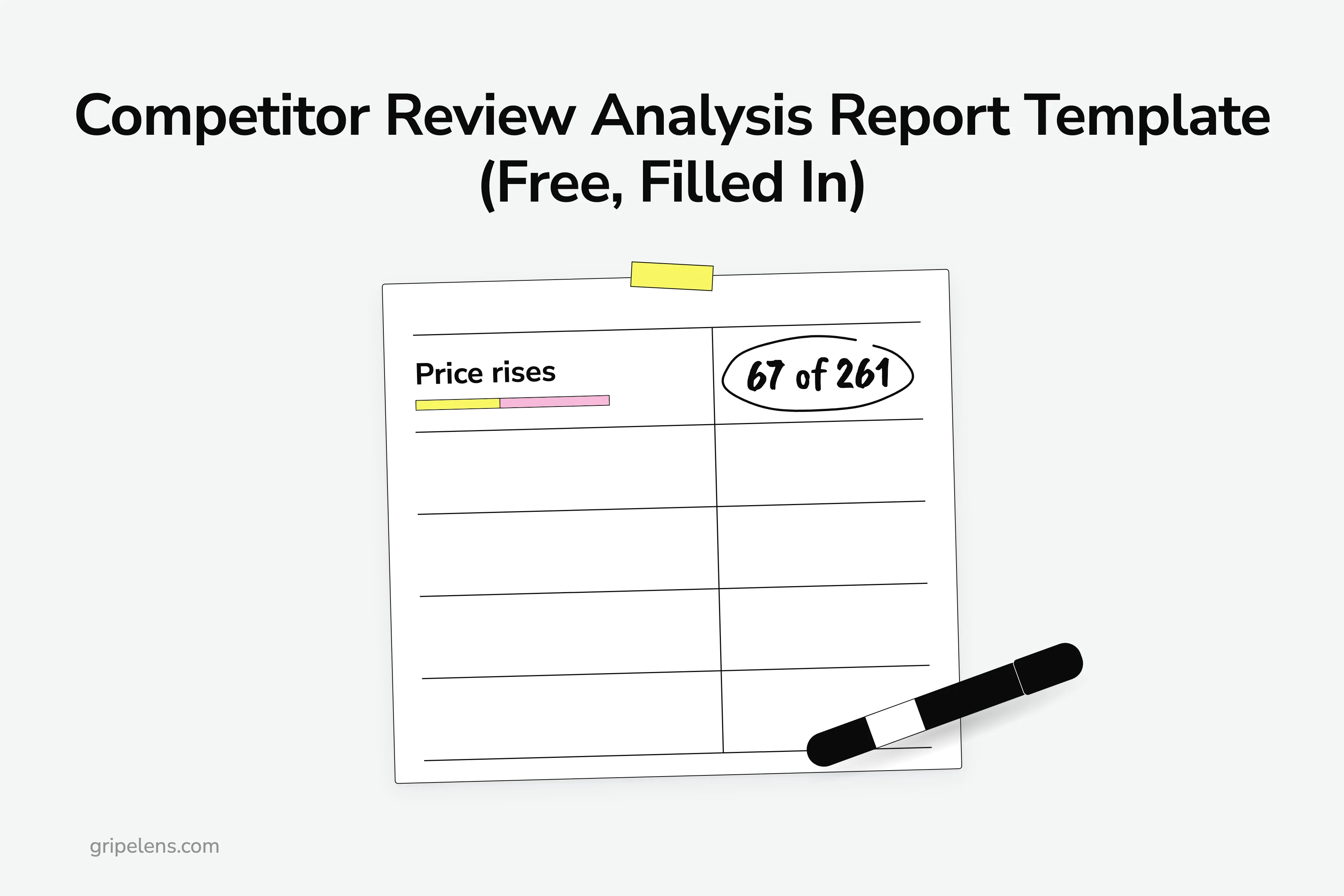
A competitor review analysis report template needs one row per complaint theme and eight columns: theme, count, n (the sample size), sources, first seen, last seen, a linked quote, and a may-be-fixed flag. You fill it in six steps. Here’s the blank one to copy, and the same table filled in from 261 real complaints about five time trackers.
I research competitor reviews by hand before building anything: for Gripelens I logged 36 tools in the category with their prices and 101 quoted complaints across 22 of them, each with its source and date.
Below: what each column is for, the template filled in from a sample report I ran on 8 October 2026, and the six steps I used to fill it.
Key takeaways
- One row per complaint theme, eight columns (theme, count, n, sources, first seen, last seen, linked quote, may be fixed), and a free blank CSV below.
- A count means nothing without n: price was 67 of 261 negative items (26%) in the time-tracker report.
- Split every count by source: price was App Store 29, Trustpilot 30 and G2 8, so any one source alone would have hidden more than half of it.
- Date every theme: 53 of 261 items were older than 18 months on the run date and may describe problems that are already fixed.
- Every theme carries one verbatim quote with the app, stars, date, source and a link you can open.
What Goes in a Competitor Review Analysis Report Template?
Eight columns, one row per complaint theme. Each column is there because a summary without it can’t be checked:
- Theme: the complaint, named in the reviewers’ words.
- Count: how many items mention it.
- n: the sample size, meaning every negative item you coded in the window. It’s the number every count is out of. A count without n is a vibe.
- Sources: the count split by App Store, G2, Trustpilot and Reddit, so you can see where a theme lives.
- First seen and last seen: the oldest and newest dated item, which tell you whether it’s still happening.
- Linked quote: one verbatim review with app, stars, date, source and a link. It’s the receipt.
- May be fixed: how many items are older than 18 months, and whether the quote is too. This separates old bugs from current ones.
One coding rule sits under all of them: one review is one item, however many themes it carries.
Why not use a template that already ranks for this search? The ones on page one are competitive-analysis grids of features, pricing and SWOT boxes, shipped as Word, Excel, PDF or an online editor. The closest thing to a review field I found among them was a single free-text “review sentiment” column, 1 of 11, with no counts, no sample size, no dates and no links.
Here’s the blank template. Copy the table, or download the blank CSV: it holds the eight column heads and nothing else, opens in Excel, and imports into Google Sheets (File, Import).
| Theme | Count | n | Sources | First seen | Last seen | Linked quote | May be fixed |
|---|---|---|---|---|---|---|---|
The Template Filled In: 261 Time-Tracker Complaints
Here is the same template filled in from a report I ran by hand on 8 October 2026 on five time trackers for freelancers: Toggl Track, Clockify, Harvest, Everhour and Timely. The window was 9 October 2024 to 8 October 2026, and n = 261 negative items. The full sample report has the rest of the evidence.
The published report shows totals per app. The per-source split, the first and last dates and the per-theme may-be-fixed counts below come from the report’s coded data.
| Theme | Count | n | Sources | First seen | Last seen | Linked quote | May be fixed |
|---|---|---|---|---|---|---|---|
| Price rises and paywalled features | 67 | 261 | App Store 29 / G2 8 / Trustpilot 30 / Reddit not counted | 2024-10-14 | 2026-10-05 | “I pay around $12 as a freelancer with a few projects each month. Just got an email to say my price increase was going up to $113 PER MONTH.” Harvest, 1 star, 13 Aug 2026, Trustpilot | 2 of 67; quote current |
| Crashes and freezes | 41 | 261 | App Store 37 / G2 1 / Trustpilot 3 / Reddit not counted | 2024-10-16 | 2026-10-06 | “it freezes nearly every time I try and open it.” Clockify, 3 stars, 10 Apr 2025, App Store | 8 of 41; quote current |
| Logged out, sign-in and sign-up failures | 37 | 261 | App Store 34 / G2 0 / Trustpilot 3 / Reddit not counted | 2024-10-30 | 2026-10-02 | “every couple of days it logs me out saying that my session has expired.” Toggl, 2 stars, 18 Mar 2025, App Store | 14 of 37; quote may be fixed |
| Lost entries and sync failures | 33 | 261 | App Store 27 / G2 0 / Trustpilot 6 / Reddit not counted | 2024-12-13 | 2026-09-09 | “it’s just lost more than a month of data for the second time” Clockify, 1 star, 2 Oct 2025, App Store | 7 of 33; quote current |
| Clunky time entry | 26 | 261 | App Store 22 / G2 2 / Trustpilot 2 / Reddit not counted | 2024-10-14 | 2026-10-06 | “The whole point of a time logging app is to log time.” Clockify, 3 stars, 30 May 2026, App Store | 8 of 26; quote current |
| An update made it worse | 16 | 261 | App Store 15 / G2 0 / Trustpilot 1 / Reddit not counted | 2024-10-23 | 2026-05-30 | “Previous version worked great, this updated version doesn’t work properly at all.” Everhour, 1 star, 6 Mar 2026, App Store | 8 of 16; quote current |
| Mobile app lacks web features | 12 | 261 | App Store 11 / G2 0 / Trustpilot 1 / Reddit not counted | 2024-10-29 | 2026-10-02 | “Would be good if your iOS app allowed me to submit my timesheet!” Toggl, 2 stars, 10 Nov 2025, App Store | 5 of 12; quote current |
Three themes are left out because the sample report publishes no theme-level quote for them: Missing features (26); Surprise charges, no refunds (22); Support unreachable (19). The full ten-theme grid is in the sample report, and I read it competitor by competitor in how to analyze competitor reviews.
What does the filled table tell you that a summary wouldn’t?
- Price is the biggest theme and also the most recent: 61 of its 67 items were posted in the last six months, and only 2 are older than 18 months. Harvest’s 2026 repricing after the Bending Spoons acquisition alone accounts for 38 of Harvest’s 70 negative items. Big and recent still doesn’t make it a complaint worth building an app on. It does make it a positioning line against Harvest.
- Price splits almost evenly between the App Store (29) and Trustpilot (30). Read one and you see half the theme.
- Sign-in has the most old items of any theme: 14 of its 37 are older than 18 months, and so is its quote. Check Toggl’s current app before you pitch against it.
Step 1: Pick the Competitors and Fix the Window
List the competitors before you read a single review. If you don’t have that list yet, find the competitors first, then come back with it.
Then fix a window and write it at the top of the sheet. Why fix the window first? n, both dates and the may-be-fixed cut are all relative to it, so a count with no window can’t be compared to anything. Write it down. Everything else hangs off it.
The sample report used five apps and a 24-month window, 9 October 2024 to 8 October 2026. Negative items per app:
- Toggl: 98
- Clockify: 78
- Harvest: 70
- Timely: 12
- Everhour: 3
Everhour and Timely are thin samples. A theme count built on 3 items is a hypothesis, not a finding, so keep those rows and mark them “treat this as rough” instead of dropping them.
Step 2: Pull Only the Negative Reviews and the Cons
Read widely, then code only the complaints. The filters I used:
- App Store and Trustpilot: 1 to 3 stars only.
- G2: the cons field (the ‘what do you dislike’ box), at any star rating.
- App Store: dedupe by review id, since the same review shows up in several country storefronts.
- Reddit: read for churn and switching, not counted in the theme grid.
Why count cons from 5-star reviews? Because that’s where complaints hide. When I logged 101 complaints across 22 tools on 2026-10-07, most Capterra reviews of those tools were 4 to 5 stars, so most of the complaints came from the cons fields of positive reviews.
Here’s how the time-tracker sources narrowed down. The App Store (US, GB, CA and AU storefronts): 2,685 reviews read, 859 at 1 to 3 stars, 178 coded. Trustpilot: 88 read, 62 coded. G2: 60 read, 21 coded. That’s 178 + 62 + 21 = 261, which is n. If your filtered pile still runs to thousands, sample it by month before you code.
Reddit gave 16 threads and 633 comments, and none of them went into a count. They answered a different question: of 24 comments that named the tool someone moved to, 9 named Keito. That’s a switching signal, so the Reddit part of the Sources cell reads “not counted”.
Step 3: Code Each Review Into Themes
Coding means reading each item and giving it one or more theme labels from a short list. The report used ten themes, coded by hand, plus a “no theme” bucket for items that fit none: 19 of the 261.
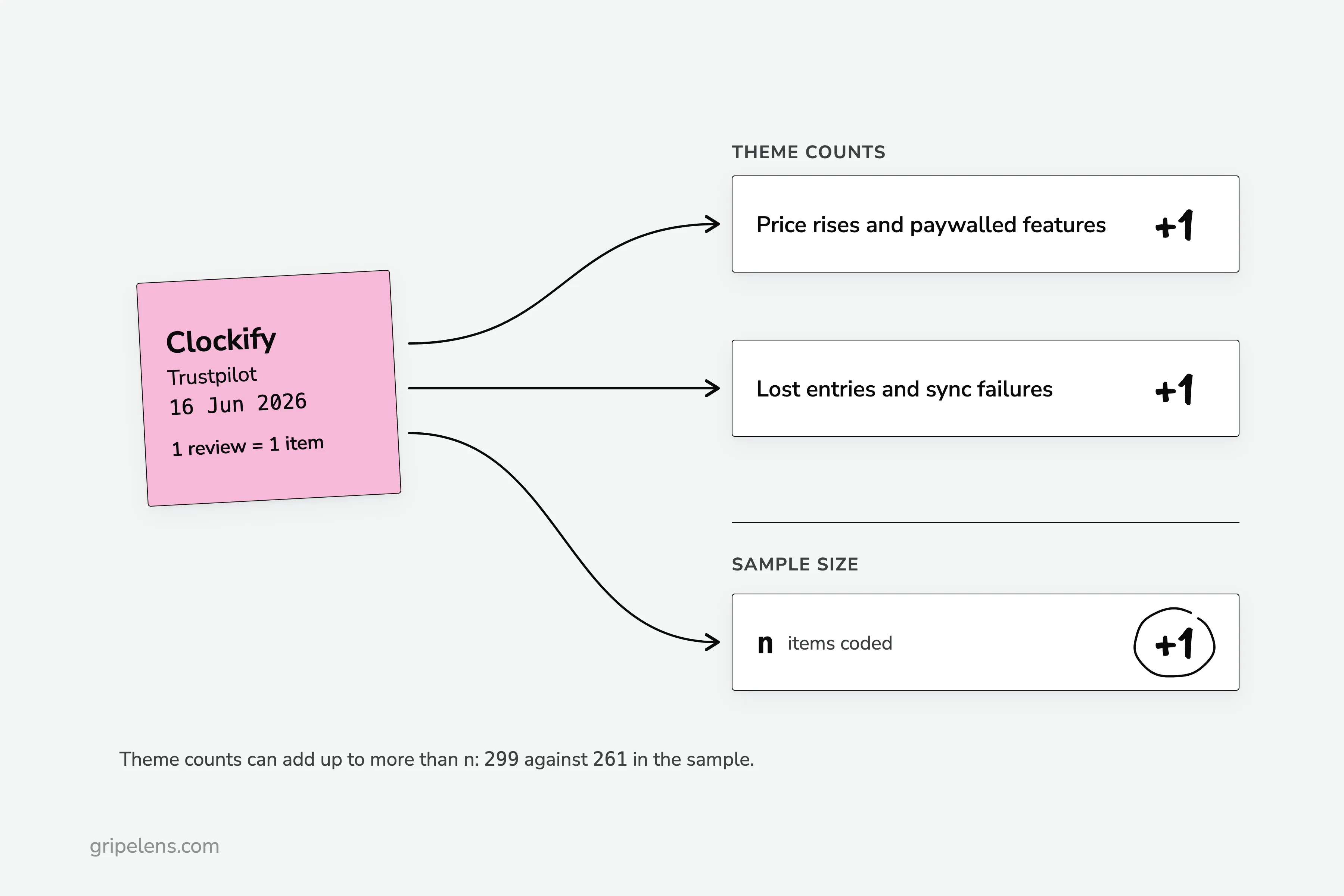
Can one review carry two themes? Yes. In the sample, I coded two Clockify reviews on Trustpilot from 16 June 2026 to both price rises and lost entries, so each added 1 to both of those counts and 1 to n.
Three rules keep the counts honest:
- One review is one item, however many themes it carries, so theme counts add up to more than n. In the sample, the ten themes total 299 against n = 261.
- Name themes in the reviewers’ words. “Logged out, sign-in and sign-up failures” says what people hit. “Authentication friction” says what you think of it.
- Keep the “no theme” bucket. Without it, odd items get pushed into the nearest theme and inflate it.
Step 4: Count Per Theme and Per Source, Then Write Down n
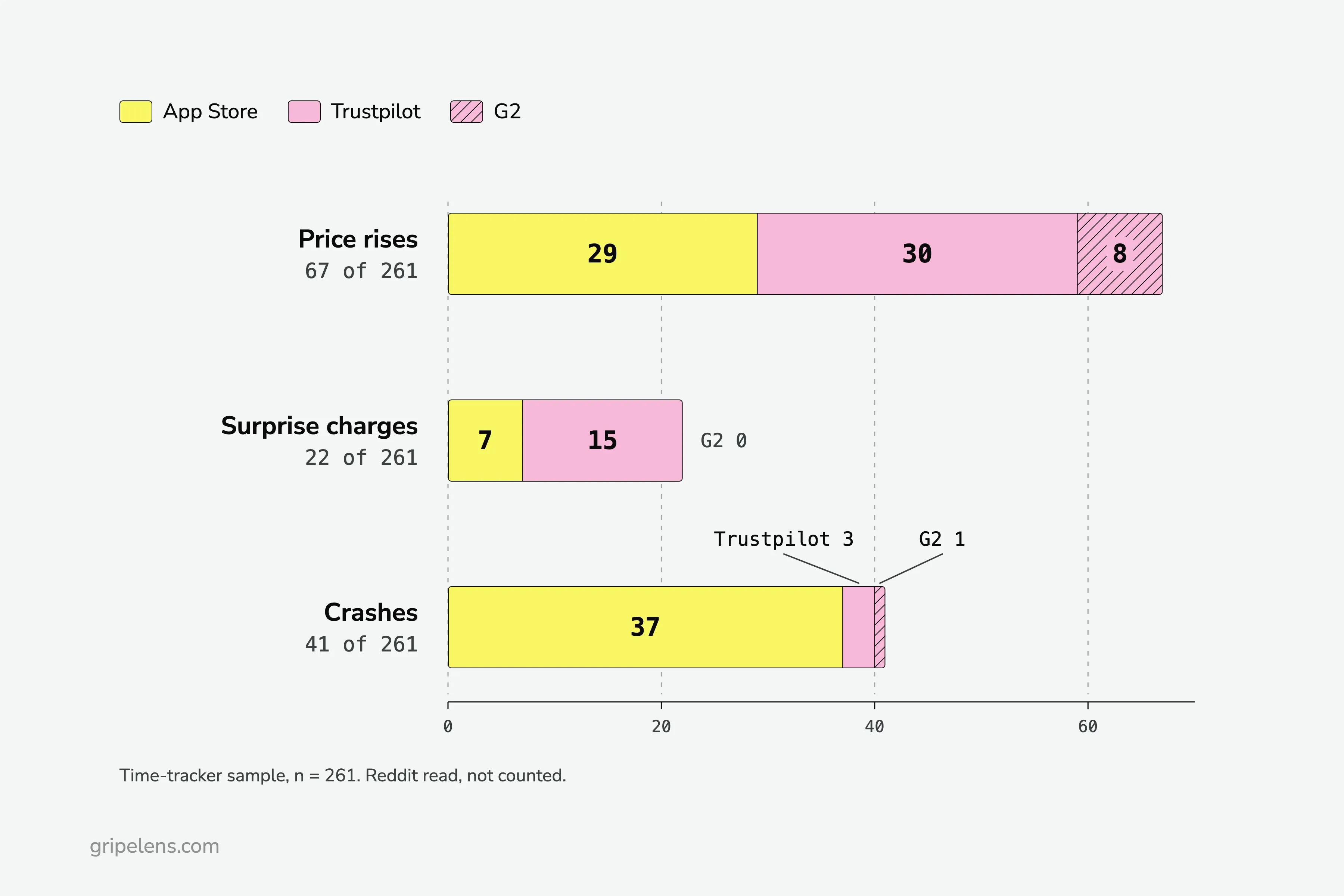
Count the items per theme, split each count by source, and write n next to every number: “67 of 261”, never a bare 67. A theme that lives on one source is a finding in itself. In the time trackers, price was App Store 29, Trustpilot 30, G2 8; surprise charges were App Store 7, Trustpilot 15, G2 0; crashes were App Store 37, Trustpilot 3, G2 1.
What would one source alone have shown you?
Read them one at a time:
- Trustpilot only: surprise charges look big (15 of 22 live there) and crashes look like nothing.
- App Store only: crashes dominate (37 of 41), and you’d miss most of the billing complaints.
- G2 only: 1 crash in 41.
This is the step with the most hand work: copying items from three sources, counting each theme per source, dating every one. Do it in the sheet, or have Gripelens do this step. It produces the same evidence: counts per source in a comparison grid, the source, date and link on every quote, the may-be-fixed flag, and a CSV export. If you’re weighing options, here are the tools that fill this table for you.
Step 5: Date Each Theme and Flag What May Be Fixed
Write two dates per theme: the oldest item (first seen) and the newest (last seen). How old is too old? I draw the line at 18 months before the run date: count the items older than that and put the number in the may-be-fixed column.
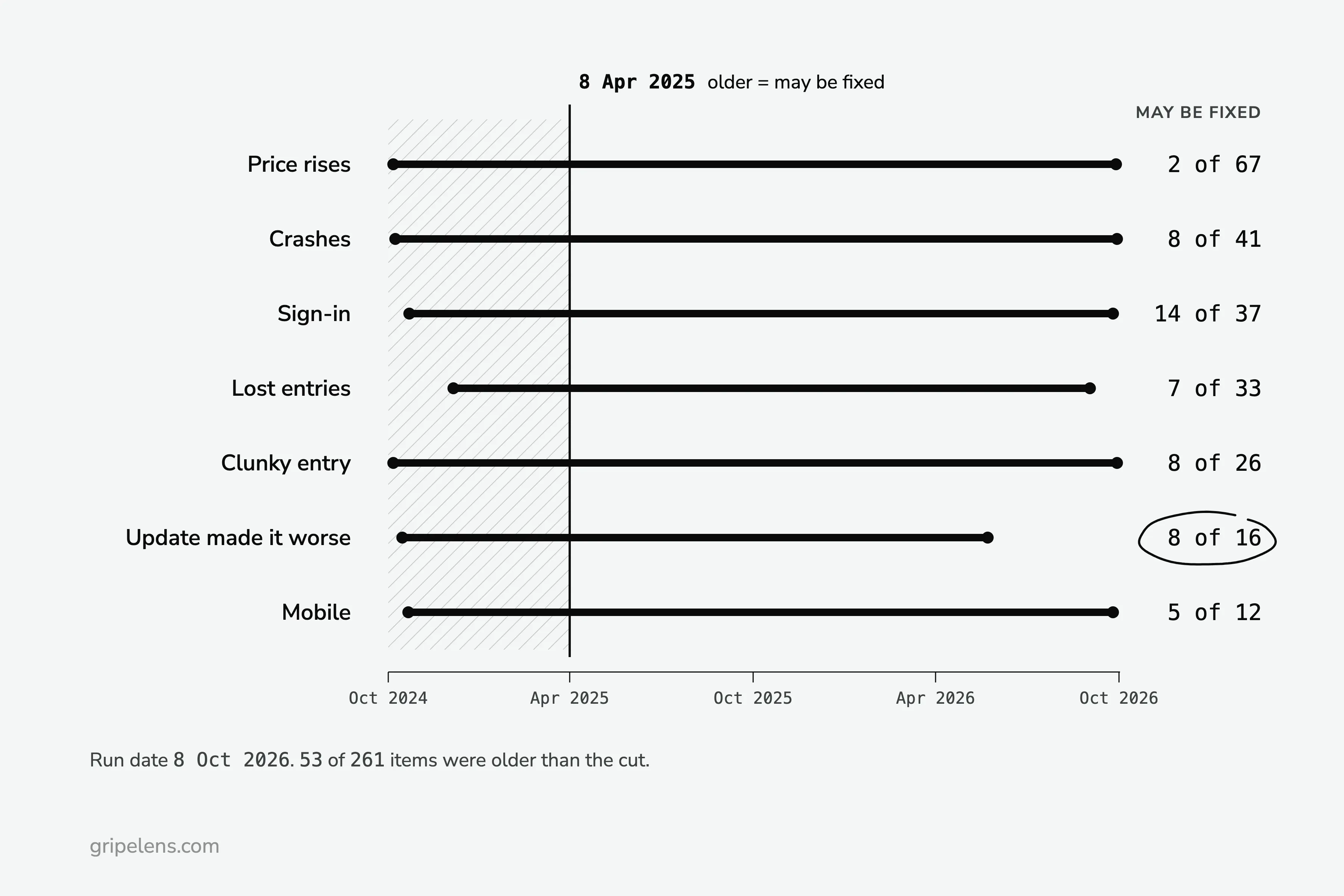
On the 8 October 2026 run, the cut fell on 8 April 2025. In total, 53 of the 261 items were older than that, and the split by theme was uneven:
- Price rises and paywalled features: 2 of 67 (first seen 2024-10-14, last seen 2026-10-05)
- Crashes and freezes: 8 of 41 (first seen 2024-10-16, last seen 2026-10-06)
- Logged out, sign-in and sign-up failures: 14 of 37 (first seen 2024-10-30, last seen 2026-10-02)
- Lost entries and sync failures: 7 of 33 (first seen 2024-12-13, last seen 2026-09-09)
- Clunky time entry: 8 of 26 (first seen 2024-10-14, last seen 2026-10-06)
- An update made it worse: 8 of 16 (first seen 2024-10-23, last seen 2026-05-30)
- Mobile app lacks web features: 5 of 12 (first seen 2024-10-29, last seen 2026-10-02)
Flag the quote too. The Toggl sign-in quote is dated 18 March 2025, before the cut, so the filled table marks it “may be fixed”. A complaint that old may describe a bug that’s gone.
Watch the last-seen date as well. “An update made it worse” was last seen on 30 May 2026, with 1 item in the last six months. That theme may be over. Re-run the table each month and the last-seen column becomes a trend; I set out a monthly routine for tracking competitor complaints.
Step 6: Attach One Linked Quote and Check for Bursts
Pick one verbatim quote per theme and give it five things: the app, the stars, the date, the source and a link that opens the review. Pick a recent one where you can. Six of the seven quotes in the filled table are newer than the cut; the sign-in quote isn’t, and the flag says so.
Copy the quote exactly. If it’s long, cut only at the end, with an ellipsis, never in the middle.
Then check the review dates for bursts before you trust any count. Three cases from the time trackers:
- Nine of the ten newest Toggl reviews on G2 are dated 6 October 2026. That looks like a review campaign, so I kept their cons but weighted them less. In your sheet, keep them in the count and note the burst next to it, so a reader can discount it.
- Everhour’s 10 Trustpilot reviews are all 5 stars. Not counted, noted as solicited.
- Clockify had an organic burst: 8 Trustpilot complaints about its free-plan cut in the four days from 16 June 2026, right after the change went live.
Is every burst a red flag? No. The Clockify one was people reacting to a real change, and those complaints stay in the count.
If You’d Rather Not Fill It by Hand
If you want this table filled in for your market, with counts per source, dated quotes with links and the may-be-fixed flag, get early access: launch pricing is locked for a year for the first wave.
Get early access. If you’d rather keep the spreadsheet, the six steps above work by hand with the blank CSV.
FAQ
Can I use this template in Excel or Google Sheets?
Yes. The blank CSV opens in Excel as it is, and in Google Sheets you bring it in with File, Import. It holds only the eight column heads (theme, count, n, sources, first seen, last seen, linked quote, may be fixed), so you add your own rows and any formatting you want.
How many reviews do I need before the counts mean anything?
Write n next to every count, whatever it is, so a reader can judge it. The time-tracker report had 261 negative items in total, and the apps with only 3 and 12 items (Everhour and Timely) were marked as thin samples. Treat any row built on a handful of items as rough.
Why count only negative reviews?
Because complaints are the signal: they show what breaks, what’s missing and why people leave. Count 1 to 3 star reviews on the App Store and Trustpilot, plus the cons field on G2 at any rating, because complaints also hide in positive reviews.
When is a complaint too old to use?
Flag anything older than 18 months at your run date as “may be fixed”, and flag the theme’s quote if it’s that old too. In the time-tracker sample that was 53 of 261 items. Keep them in the count, but check the product’s current version before you build a pitch on them.
Can ChatGPT fill this template for me?
It can suggest themes for reviews you paste in. Check the counts, n, the dates and the links yourself, though: the columns are there so a summary can’t quietly drop them.