How to Analyze Thousands of Reviews by Hand: 6 Steps
I read 2,685 App Store reviews, plus Trustpilot and G2, and coded 261 negative items by hand. The 6 steps: filter, sample, theme, code, count, check.
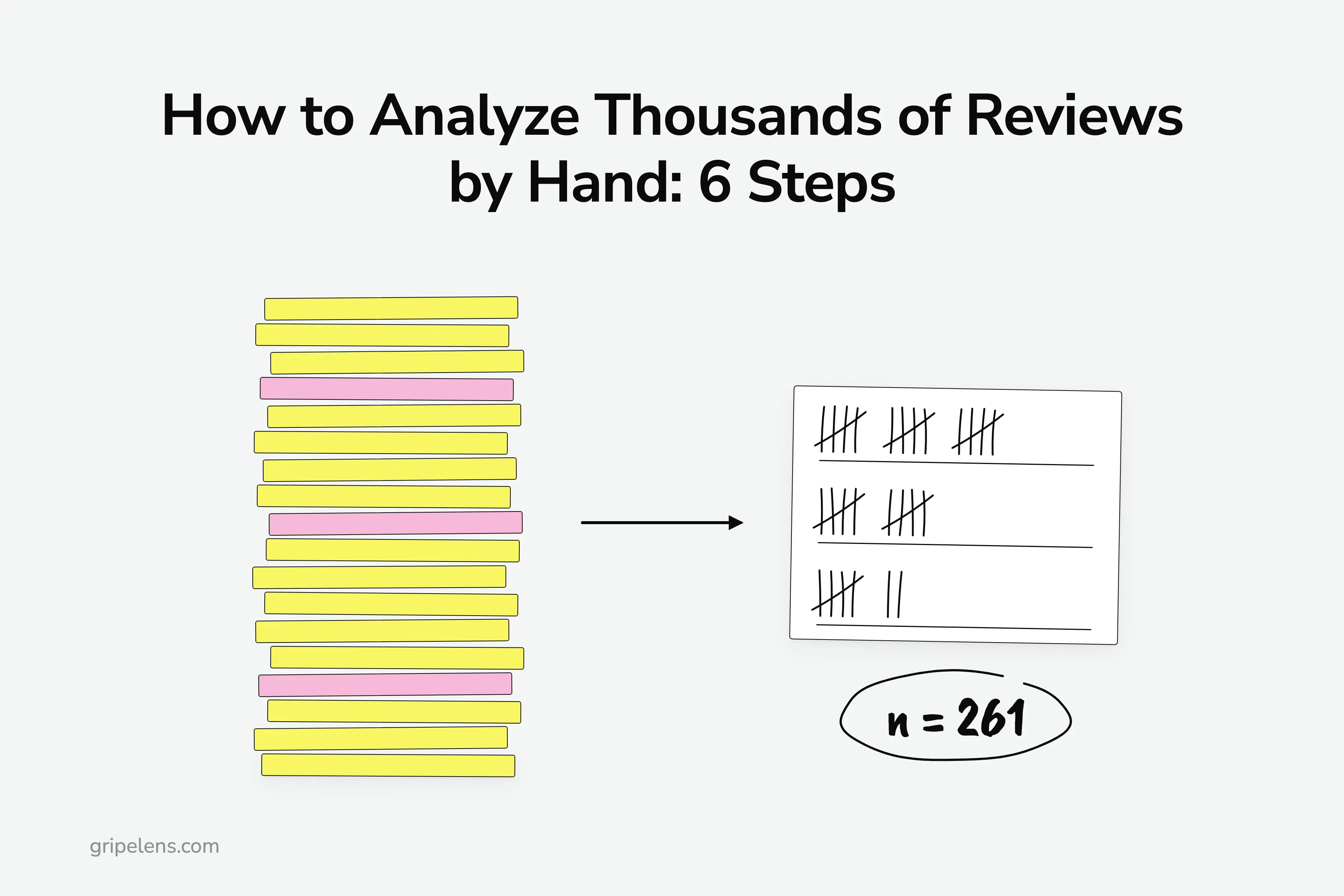
To analyze thousands of reviews, don’t read them all. In six steps you get a count per complaint theme, each out of a stated n (the number of reviews you actually coded), with a checked, dated quote behind it: cut the pile to complaints, sample by month if it’s still too big, fix a theme list, code in batches, count, check. A spreadsheet is enough.
The pages ranking for this search are mostly vendor guides, and each one ends in the vendor’s own tool. One r/UXResearch poster sitting on 5K+ scraped Trustpilot reviews asked for something else: “I’m not interested in specific tools though, more the method behind those tools!”
I research competitor reviews by hand before building anything: for Gripelens I logged 36 tools in the category with their prices and 101 quoted complaints, each with its source and date, and on 8 October 2026 I read 2,685 App Store reviews of five time trackers, plus Trustpilot and G2, and coded 261 negative items.
Below: the six steps, what each one looked like on the time-tracker run, and where pasting a thousand reviews into ChatGPT breaks.
Key takeaways
- Six steps turn thousands of reviews into a count per theme with its n: filter, sample, fix a theme list, code in batches, count, check every quote.
- Filter first. On the App Store, 859 of 2,685 reviews read were 1 to 3 stars (32%), and complaints also hide in the cons fields of 4 and 5 star reviews.
- Write the theme list before you count, and keep a “no theme” bucket: 19 of 261 items landed there in the time-tracker run.
- Pasting a thousand rows into a chatbot breaks at scale; one r/UXResearch poster saw everything after about 40 rows filed as “Other”.
- Write every count as “67 of 261”, never a bare number or a share of “users”.
Step 1: Cut the Pile to Complaints
Most of a big review pile is praise, and praise rarely tells you what to fix or build. If the reviews are competitors’, rank the competitors by review count first and pull the top few, then cut each pile down to the complaints.
Write the filters down before you start:
- App Store and Trustpilot: 1 to 3 stars only.
- G2: the cons field (the “what do you dislike” box), at any star rating.
- A fixed window. Mine was 24 months.
- App Store: dedupe by review id, because the same review turns up in several country storefronts.
Why throw away the happy reviews? Because practitioners who deal with this at volume land in the same place. “I mostly only read the negative reviews and try to figure out if it focuses on a solveable issue, or was it just a bad fit for this player?” wrote u/Cz4q on r/gamedev.
One exception: on any site with a cons field, keep the cons at every star rating. Most of the 101 complaints I logged on 7 October 2026 came from the cons fields of 4 to 5 star Capterra reviews.
Reviews per source, time-tracker run, 8 October 2026:
| Source | Read | At 1 to 3 stars | Coded |
|---|---|---|---|
| App Store (Apple’s public review feed, US, GB, CA and AU storefronts) | 2,685 | 859 | 178 |
| Trustpilot | 88 | 78 | 62 |
| G2 | 60 | Cons at any rating | 21 |
| Total coded | 261 |
Pulling and deduping reviews across three sites by hand is the step that hurts most. Do it in a sheet, or have Gripelens do this step: it reads public reviews across six sources and keeps the source, date and link on every quote. The sample report shows the format.
Step 2: Sample by Month When the Pile Is Still Too Big
After the filters, can you code the pile in a sitting or two? If not, sample it. Don’t take the newest N, though. Spread the sample across months.
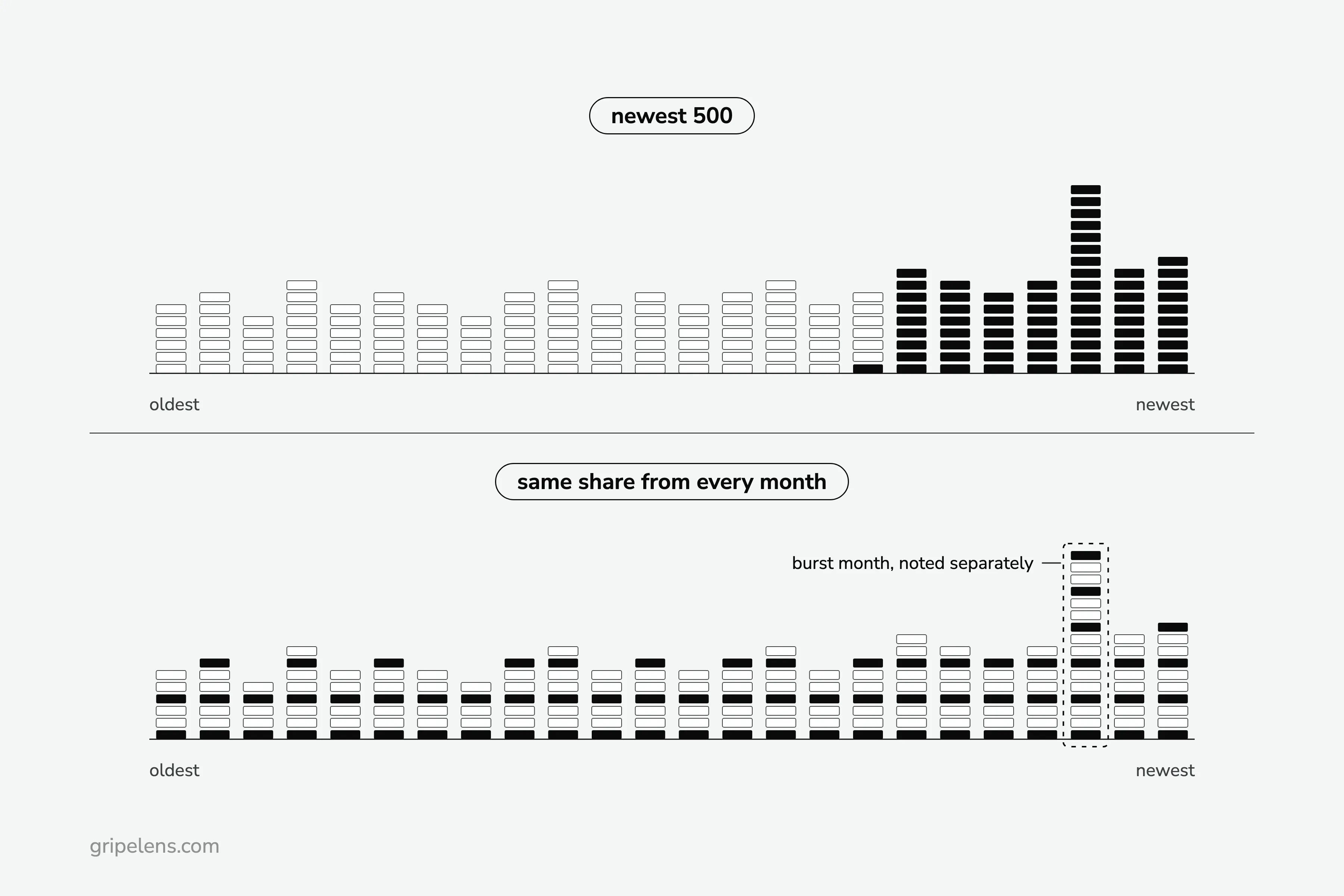
Why not the newest 500? The newest page over-represents whatever just happened: a price change, a release, a vendor’s review drive. When I logged complaints on 7 October 2026, 23 of Chattermill’s 25 Capterra reviews fell in two short windows (October 2021, and December 2022 to January 2023). That pattern looks like two drives. A sample from inside one of those windows tells you about the drive, not the product.
The method:
- Count the complaints per month across your window.
- Take the same share from every month, for example every third review.
- Note burst months separately instead of letting them fill the sample.
- Write the sample size down. It becomes n.
How big a sample? There’s no fixed number. One practitioner’s rule, from the r/UXResearch thread on a large review data set: “If you read and code 500 to 1000 of the reviews, you’ll pick up the main themes and with that you can extrapolate to the larger set…” (u/Patheticle). Treat this as rough.
One vendor page on this search sums itself up in Google’s results as “Stop sampling your data”. Fine, if a model reads everything for you. By hand, a month-spread sample with its n written next to it beats a pile you skimmed.
For your own app, this is the same idea as reading monthly. A studio lead in the r/gamedev thread put it in spring 2026: “You don’t really come into a game with 10k reviews all at once, you’re reading them over time as they come in which is a lot more manageable.” For a competitor, the same monthly reading becomes a count per theme you compare month to month: here is how to track what users hate about competitor products.
My time-tracker run didn’t need this step: after the filters, 261 negative items was a pile I could code in full.
Step 3: Write the Theme List Before You Count
A theme is a label for one kind of complaint. Read a first batch, say the first 50 items, and draft a short list from what you see (50 is my habit; treat it as rough).
For each theme, write three things:
- a name in the reviewers’ words
- a one-line definition
- one example quote
Then freeze it. Why? A label that drifts halfway through makes the early counts and the late counts measure different things, and you can no longer add them up.
The time-tracker run used ten themes. Three of the names:
- “Logged out, sign-in and sign-up failures”
- “Lost entries and sync failures”
- “An update made it worse”
Each one says what the reviewer hit. “Data integrity issues” would be your label, not theirs, and it hides whether people lost an hour or a month.
How many themes? I aim for 8 to 12, and the example landed on ten. Treat that as rough too.
Add a “no theme” bucket. In the time-tracker run, 19 of 261 items (7%) fit none of the ten. If the bucket grows past roughly one item in ten, revise the list once and recode everything so far. Rough again, but it stops you pushing odd items into the nearest theme and inflating it.
Step 4: Code in Batches, One Review at a Time
Coding means reading one review and giving it one or more themes from the frozen list. Set up the sheet with one row per review and seven columns: review id or link, source, date, stars, theme 1, theme 2, and the exact quote you may reuse.
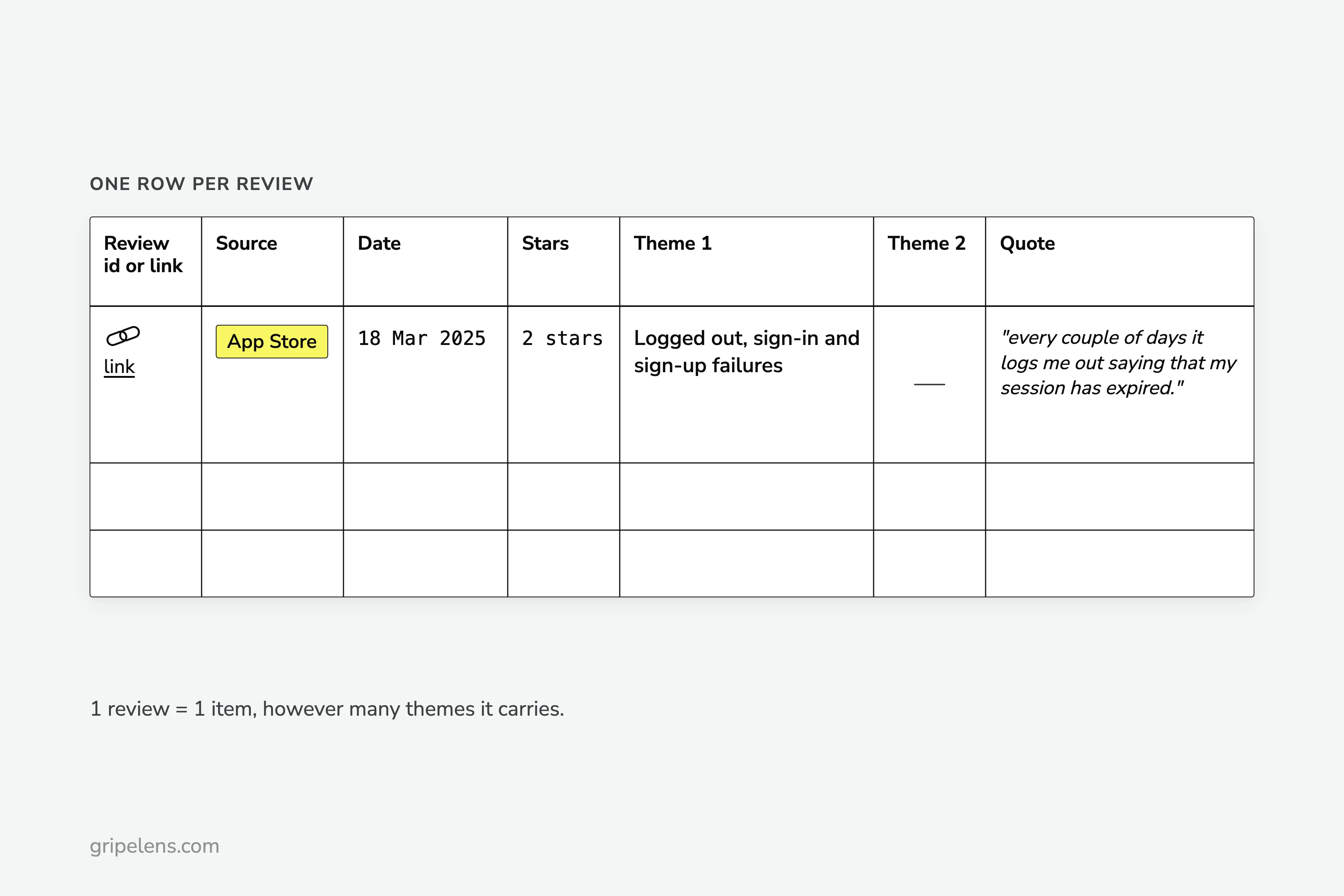
Example row: App Store, 18 Mar 2025, 2 stars, theme 1 “Logged out, sign-in and sign-up failures”, theme 2 empty, quote “every couple of days it logs me out saying that my session has expired.”
Three rules, all mine, all rough:
- Code in batches of about 50, then take a break.
- One review is one item, however many themes it carries.
- At the end, recode 20 items from the first batch without looking at your old labels, and compare. If a lot of them change, your definitions are too loose.
Why Not Paste It All Into ChatGPT?
Because when you analyze thousands of reviews in one paste, it breaks, and the people who tried describe how. The r/UXResearch poster with 5K+ reviews reported what happened when they tried: “It will classify the first 40 rows quite well - with some minor hallucinations as expected - but then the rest of the 1000+ rows it will simply categorized as: ‘Other’”.
A seller on r/FulfillmentByAmazon pasted 700+ of 4,000+ reviews into ChatGPT Plus and hit a limit of 30 at a time; asked for patterns, it returned “the”, “it”, “I”. That was 2023, and the tools have moved since.
Sentiment scores don’t rescue it either. “Sentiment analysis is pretty crap,” u/bette_awerq wrote in the same r/UXResearch thread. A positive or negative score doesn’t say what broke.
What does work with a model:
- Give it the frozen theme list, not “find the themes”.
- Feed it small batches.
- Check a sample of its labels by hand, and every quote it hands back.
If you’d rather hand the coding to software, here are the tools that do the counting for you. The same checks apply to all of them.
Step 5: Count Every Theme With Its n
Count the items per theme and write n next to every count: “67 of 261”, never a bare 67 and never “26% of users”. You counted reviews, not people.
Negative items per theme, out of n = 261:
| Theme | Items | Share of 261 |
|---|---|---|
| Price rises and paywalled features | 67 | 26% |
| Crashes and freezes | 41 | 16% |
| Logged out, sign-in and sign-up failures | 37 | 14% |
| Lost entries and sync failures | 33 | 13% |
| Clunky time entry | 26 | 10% |
| Missing features | 26 | 10% |
| Surprise charges, no refunds | 22 | 8% |
| Support unreachable | 19 | 7% |
| An update made it worse | 16 | 6% |
| Mobile app lacks web features | 12 | 5% |
The ten counts add up to 299, not 261, because one item can carry several themes. If you sampled, report the sample’s n. Don’t scale the counts up to the whole pile. With several competitors, split each count by competitor and read it against that competitor’s own n, as in this grid of five time trackers.
What did it say? Price led, and 61 of the 67 price items came in the last six months of the window.
A count only helps if it changes a decision. In a self-reported post on r/AppStoreOptimization, a poster who builds a review-analysis tool said that 1,695 of 3,343 negative reviews (50.7%) of an unnamed wellness app were about monetization, out of 21,412 reviews. One reply: “there is no value knowing that users that don’t want to pay don’t want to pay, we already know that”. Fair. It’s why I drop price-only complaints when I look for app ideas in one-star reviews.
The columns I put every count in, with n, sources and dates, are in a report template for the counted themes.
Step 6: Check Every Quote, Its Date and the Bursts
Before a quote goes into a pitch or onto a landing page, open its link and check that it’s verbatim, dated and still there. Then check the dates of everything behind the count.
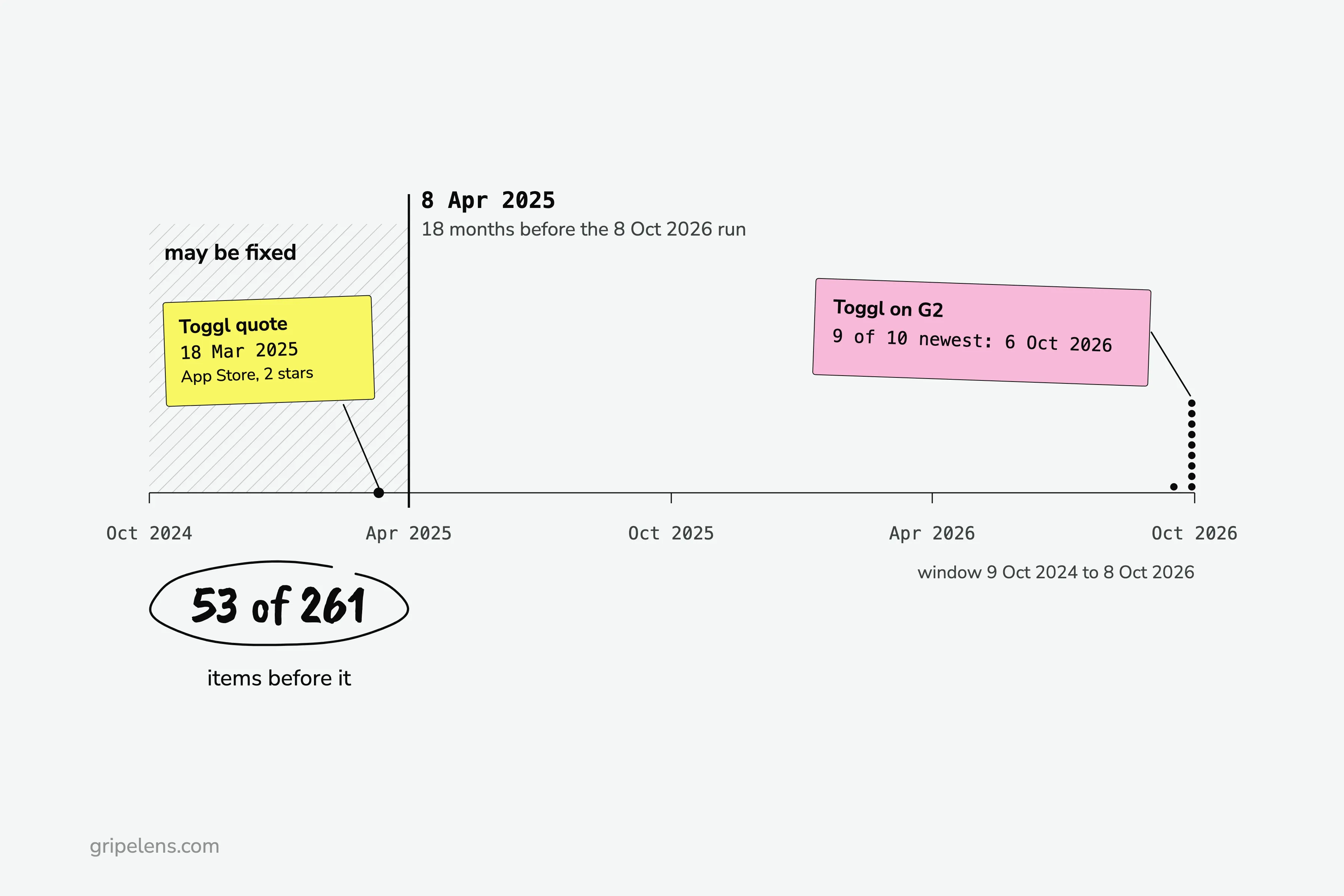
I flag anything older than 18 months at the run date as “may be fixed”. On the 8 October 2026 run, with a window from 9 October 2024 to 8 October 2026, the cut fell on 8 April 2025, and 53 of 261 items predate it. The Toggl sign-in quote is one of them: “every couple of days it logs me out saying that my session has expired.” (2 stars, App Store, 18 Mar 2025). That makes it a “may be fixed” quote, not proof of a current problem.
Is any count propped up by a single week? Nine of the ten newest Toggl reviews on G2 are dated 6 October 2026. I kept them in the count and wrote the burst next to it, so a reader can discount it. Here’s how to spot a review burst in the dates.
Appbot’s guide says it well: “Aggregates tell you where to look, not what is happening.” The quote check is how you find out what is happening.
If You’d Rather Not Count by Hand
If you want the complaints pulled, counted and dated across six sources, get early access: launch pricing is locked for a year for the first wave.
Get early access. The six steps work in a spreadsheet either way.
FAQ
How many reviews do I need to read to find the main complaints?
There’s no fixed number. One r/UXResearch practitioner’s rule is to read and code 500 to 1,000 by hand, and treat that as rough. Whatever you code, write n next to every count so a reader can judge it, and mark any theme built on a handful of items as a thin sample.
Can ChatGPT analyze thousands of reviews?
Not in one paste. One r/UXResearch poster saw a chatbot label the first 40 rows well and file the rest of 1,000+ as “Other”. Give it a fixed theme list and small batches, then check a sample of its labels and every quote yourself.
Should I ignore 5-star reviews?
On sites without a cons field, mostly yes: 1 to 3 star reviews carry the complaints. On sites with a cons field, keep the cons of 4 and 5 star reviews. Most of the 101 complaints in my October 2026 research came from exactly there.
Is sentiment analysis enough?
No. A positive or negative score doesn’t say what broke, what’s missing or why someone left. Count themes instead, each with its n and a dated quote.