Best App Review Analysis Tools for Indie Developers (2026)
Reading your own app's reviews rarely needs a tool. Reading competitor apps does. I compared 6 options on what each reads, counts, dates and costs.
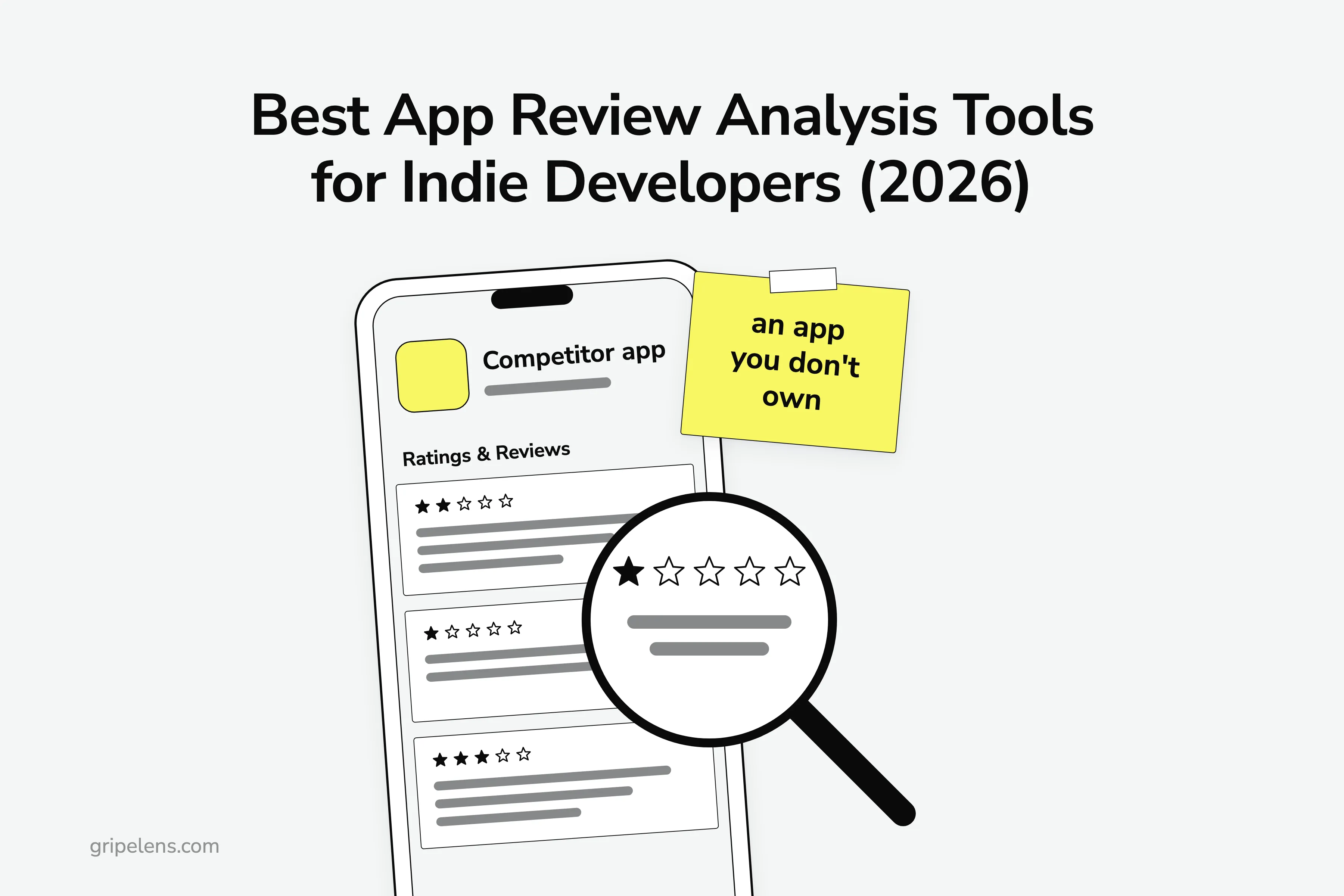
The best app review analysis tool for indie developers reading competitor apps is Appbot, if you want their full review history on the App Store and Google Play; on a zero budget, start with AppFollow’s free plan. Your own app’s reviews you can read for free; it’s the apps you’re up against that need a tool.
I research competitor reviews by hand before building anything: for this product I logged 36 tools in the category with their prices and 101 quoted complaints, each with its source and date. For the sample report I pulled 2,685 App Store reviews of five competitor time trackers across four storefronts and coded 178 negative ones by hand.
The popular advice for turning competitors’ one-star reviews into app ideas is “Read their 1-star and 2-star reviews” (@VechAlex, 101 likes), and it never says how many, from which store, or how old.
Below: the short answer, when your own app needs a tool, and how I compared six options. Then the table and one section per tool, what my own run says a tool must show you about a competitor app, and which to pick.
Key takeaways
- Appbot is the pick for competitor apps’ full review history in both stores (Medium, $99 a month billed annually, covers your app plus 3 competitors on both stores); on a zero budget, AppFollow Free gives you 10 competitor slots, on a plan with 7 days of history.
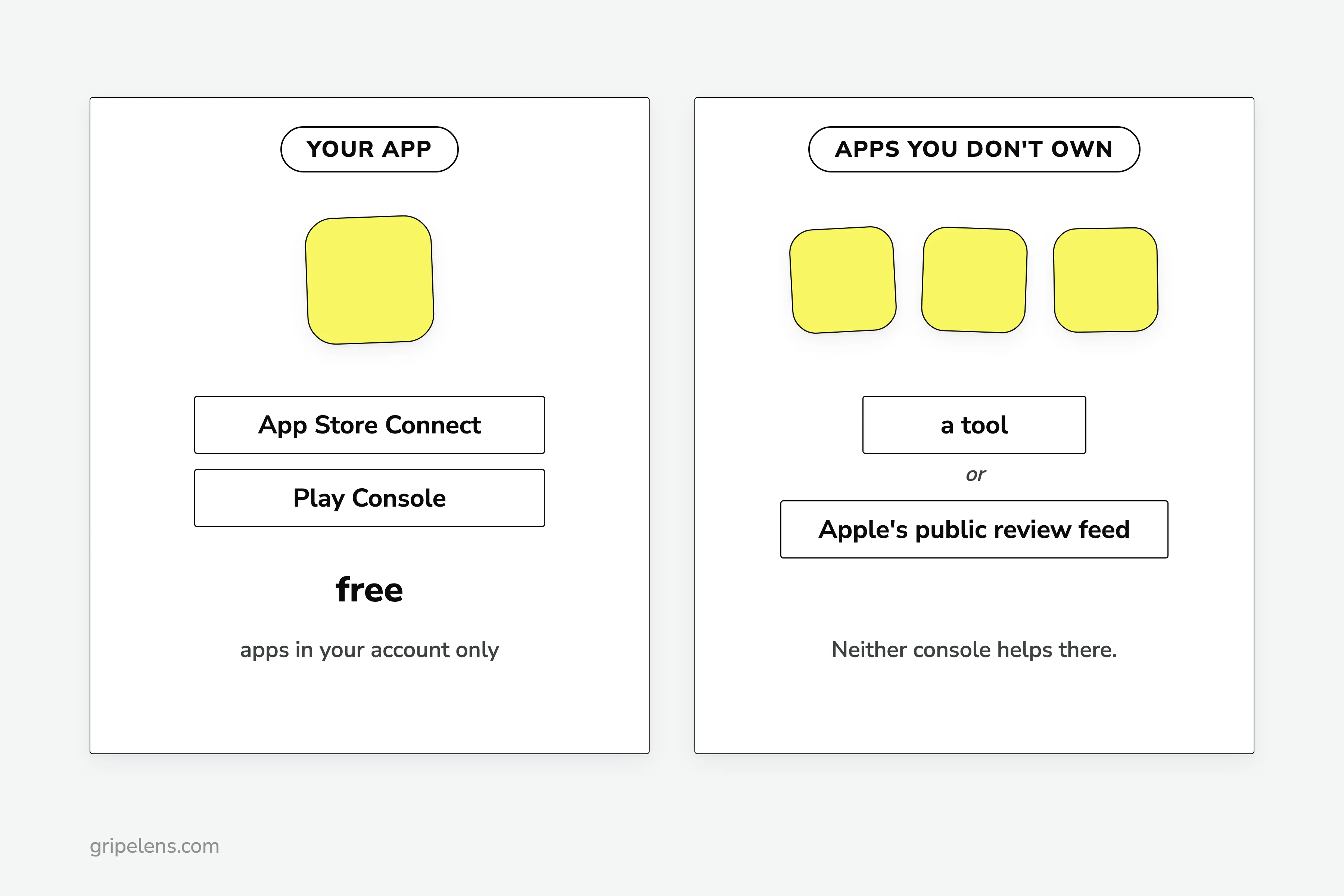
- App Store Connect and Play Console show your own apps’ reviews for free, so apps you don’t own are where a tool earns its price.
- Appbot counts each competitor app in each store as a plan source, so your app plus 3 competitors on both stores is 8 sources, and the Small plan’s 5 don’t fit.
- Kimola and Enterpret’s free App Review Analyzer read any app from a pasted link, but you supply every link, and neither page describes counts with a sample size.
- Whatever you use, check the base: which storefronts, how many reviews, over what window, and how old the quotes are (in my run, 53 of 261 coded items were older than 18 months).
What Is the Best App Review Analysis Tool for an Indie Developer?
It depends on how much history you need on the competitor apps and what you can spend. One line per buyer:
- Appbot, if you want the full review history of competitor apps on both stores. Each competitor app in each store uses a source on your plan, so count your listings first.
- AppFollow Free, if your budget is zero: 2 apps, 10 competitors and 7 days of history, with replies for your own app when you need them later.
- Kimola, if your competitors also get reviewed on Amazon or Trustpilot and you don’t mind pasting every link.
- Enterpret’s free App Review Analyzer, for a one-off look at up to 5 store listings.
- The free route, Apple’s public review feed plus a spreadsheet, if the App Store is enough and you’ll spend the hours.
- Gripelens, which I build, if you want the competitors found for you; its section below carries the trade-offs.
Do You Need a Tool for Your Own App’s Reviews?
Not at low volume. App Store Connect shows the reviews of your app, filterable by country or region, app version and rating: in Apple’s words, “the overview rating, the reviews summary or individual customer reviews of your app”. Play Console’s Reviews analysis page shows “top trends and issues for your app”, with themes for reviews written in English.
“Once a week I go manually through them,” u/Trojanheadcoach wrote on r/appledevelopers in June 2026. That’s a real workflow.
A tool starts to pay once you sit on thousands of reviews, hit a launch spike, or need replies and alerts in several countries. As u/Evening_Hawk_7470 put it: “I’d still move to appfollow once the hard part becomes replies, alerts, and review ops across countries.”
So what’s left?
The person who started the once-a-week thread raised the case this post is about: “pms tracking competitor apps that they don’t own” (pms being product managers). Neither console helps there.
App Store Connect lists only the apps in your account, and Play Console shows other apps only as category benchmarks, “how your app compares to others in the same Google Play category”. For apps you don’t own, you need a tool or Apple’s public review feed. That’s the job this post compares.
How I Compared
I build Gripelens, so weigh this accordingly. I applied eight criteria, in this order:
- Does it read a competitor app you don’t own, and on what terms: a plan source, a competitor slot or a pasted link?
- Does it find the competitors for you, or do you supply them?
- Which stores and countries does it cover?
- How much history does it give you on a competitor app?
- Does it count each theme with a sample size?
- Does it show a dated quote with a link back to the review?
- Does it flag old reviews, or review bursts (a pile of reviews in a short window, often a vendor campaign)?
- What’s the entry price, and what does one setup cost: your app plus 3 competitor apps, each on the App Store and Google Play, so 8 store listings? Prices here are entry prices; what these tools cost side by side has every tier.
I read each vendor’s pricing, feature and docs pages in a browser: Appbot and AppFollow on 2026-11-02, Enterpret on 2026-11-03, Kimola on 2026-10-30. I didn’t buy plans or start trials. I didn’t run Enterpret’s free analyzer either, so its section says only what its page says.
The free route is my own run from 2026-10-08. Gripelens comes from its own feature list. Where a vendor’s page doesn’t say, the table says so instead of writing “no”.
The 6 Options Compared
Every cell below is a price, a limit or what a vendor’s own page says. One section per option follows, with who it suits and what it costs you.
| Option | How it reads a competitor app | Finds competitors | Stores | History on a competitor app | Counts and dated quotes | Entry price (read date) |
|---|---|---|---|---|---|---|
| Appbot | Each competitor app per store is one plan source; added by hand | No | App Store (iOS, macOS), Google Play, Microsoft Store; every country | Full history backfilled on signup | Ask Appbot states review count and date range (Large plan) | No free plan, 14-day trial; Small $49/mo billed annually (2026-11-02) |
| AppFollow | Public data only: no store connection, replies or integrations; competitor reviews in the feed since Sept 2026 | No | App Store, Google Play and more | Plan history 7 days (Free) to full (Team); not stated whether it applies to competitors | Per-theme counts not seen | Free: 2 apps, 10 competitors; ASO $19/mo billed annually (2026-11-02) |
| Kimola | You paste each store link | No | App Store (up to 500 reviews), Google Play (up to 5,000) | The scrape cap | Not described on its pages | Free: 150 queries/month; Basic £32/mo billed annually (2026-10-30) |
| Enterpret App Review Analyzer | Paste up to 5 store URLs | No | App Store, Google Play | Not checked | Not checked | Free; paid product demo only (2026-11-03) |
| Free route: Apple’s review feed + a sheet | Any app ID, one storefront at a time | No | App Store | The 500 most recent per storefront (10 pages of 50) | Yes, if you count them; you keep the dates and links | Free (your hours) |
| Gripelens | Finds the competitors from a product or category | Yes | App Store and Google Play among six sources | Full review history | Count and sample size on every theme; every quote with source, date, link | See pricing |
Appbot
Appbot is best suited to indie developers who want the full review history of 2 or 3 competitor apps on both stores, tracked over time next to their own. Of the third-party tools here, it’s the only one whose pages confirm full review history backfilled on signup, competitor apps included, from the App Store (iOS and macOS), Google Play and the Microsoft Store in every country. You add competitors by hand, and its Compare page puts volume, average rating, sentiment and trend lines side by side.
The trade-off is how it counts. A source is “a single app in a single app store”, and each competitor app in each store counts as one source on your plan. Your app plus 3 competitors on both stores is 8 sources. Against Appbot’s plans:
- Small, $49 a month billed annually, holds 5 sources. It doesn’t fit.
- Medium, $99 a month billed annually ($119 monthly), holds 40.
- Large, from $166 a month billed annually, adds Ask Appbot (a chat that states the review count and date range behind each answer) and its MCP server, a connector that hands your competitors’ reviews to an AI assistant like Claude; I compared MCP servers that read review data separately.
There’s no free plan, only a 14-day trial of Large with no card needed. I saw no quote-age or burst flag on any of its pages.
AppFollow
AppFollow is best suited to indie developers on a zero budget who want recent reviews from up to 10 competitor apps now, and replies and ASO (app store optimization, the store-ranking side) tools for their own app later. AppFollow’s plan table gives the free plan 2 apps and 10 competitors. Since September 2026, competitor reviews show up in its feed with filters, tags, an AI summary, sentiment and a country breakdown.
The trade-offs:
- History is set by plan: 7 days on Free, 30 on ASO ($19 a month billed annually), 365 on Essential ($129 a month billed annually). Its pages don’t say whether that limit applies to competitor apps; if it does, alternatives with full competitor history cost more but keep the past.
- Competitor apps run on public data only. In AppFollow’s words, they “cannot use store connections, integrations, or review replies.”
- I saw no per-theme counts on its pages.
Is a week enough?
If the 7-day limit does apply to competitors, a week of reviews is a thin sample. Ask before you rely on it.
Kimola
Kimola is best suited to developers whose competitors also get reviewed outside the stores, on Amazon or Trustpilot, and who want one report from links they paste. App Store and Google Play pages are link sources like any other, and you can combine several links into one dataset. If your competitors’ complaints live on G2 and Reddit as much as in the stores, I ranked tools for competitor reviews on G2, Capterra and Reddit separately.
The trade-off is metering. “Each analyzed data row with up to 500 characters counts as one query”, longer rows cost one query per 500 characters, and scraping counts too. So the free 150 queries a month won’t cover a single 500-review App Store pull.
That 500 is also the ceiling: App Store pulls stop at 500 reviews per product, Google Play at 5,000. Basic is £32 a month billed annually (£39 monthly) for 3,000 queries, priced in GBP. You supply every link, and its pages don’t describe counts with a sample size.
Enterpret’s Free App Review Analyzer
Enterpret’s free App Review Analyzer is best suited to a one-off look at up to 5 competitor listings before you spend anything. You paste up to 5 store URLs, App Store or Google Play, and it compares the apps.
The trade-offs start with me: I didn’t run it. Its page doesn’t say what it returns, how many reviews it reads per app, or whether it asks for an email. The example setup’s 8 listings don’t fit in 5 URLs, so that’s two runs, and I didn’t check whether the results combine.
The paid product is a different animal: demo only, no public price, built around your own feedback. On its demo page, Enterpret recommends “at least 1,000 combined feedback records from all sources … per month”. That’s a floor for a company with its own feedback pouring in, not a way to read three rival apps.
The Free Route: Apple’s Review Feed and a Spreadsheet
The free route is best suited to an indie developer reading 3 to 5 competitor apps once, before building, who will spend the hours. Apple’s public review feed takes any app ID, one country storefront at a time. My run pulled 2,685 reviews of five apps across the US, GB, CA and AU storefronts, and I deduped them by review id across storefronts.
The trade-offs:
- App Store only. My run didn’t cover Google Play.
- The feed stops at 10 pages of 50 reviews, 500 per storefront. When I asked for page 11, Apple answered “CustomerReviews RSS page depth is limited to 10”. On a busy app that’s days: on 10 November 2026, Instagram’s 500 newest US reviews went back only to 4 November.
- The counting is yours. ChatGPT or Claude can do a first-pass sort, but you count and check the quotes. An r/SideProject commenter asked the question to keep in mind: “How does the AI handle the really sarcastic reviews?”
The one shared DIY run I found on X was small. It was a promoted workflow from @darnocks, and it read “the 50 most recent reviews” per app. Treat that as one workflow, not a benchmark.
Gripelens
This is the one I build. Gripelens is best suited to founders and indie developers who want the competitors found for them and the reviews counted per source, with a dated quote behind every theme.
You type a product or a category; it finds the competitors and reads their public reviews across six sources, the App Store and Google Play among them. Every theme carries a count and its sample size, every quote shows its source, date and link, quotes older than 18 months are flagged “may be fixed”, and review bursts are marked.
The trade-offs: it’s new, and there are no published usage, accuracy or speed numbers for it. It reads six sources, so if you only want the two stores, you pay for breadth you may not use.
Its feature list has no reply or alert tools for your own app. Prices are on the pricing page.
What I Learned Coding Competitor App Reviews From 2,685 Pulled
I pulled 2,685 App Store reviews of five competitor time trackers (Toggl Track, Clockify, Harvest, Everhour and Timely) across the US, GB, CA and AU storefronts; 859 were 1 to 3 stars, I coded 178 of those, and with Trustpilot and G2 added, 261 negative items in all. The funnel and the six steps are in the full hand-counting method.
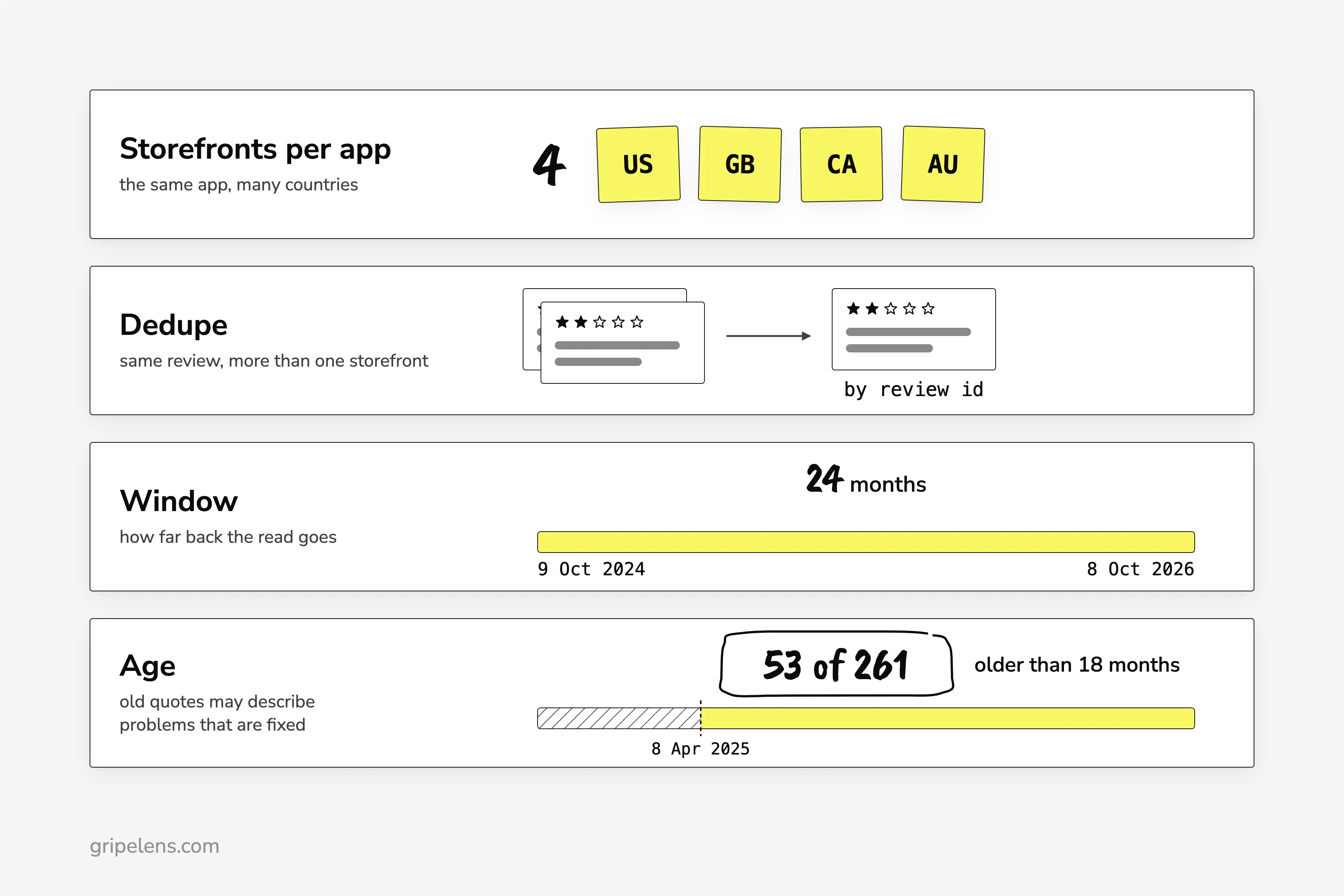
What that run says any tool has to show you about a competitor app:
- Storefronts per app. The same app collects reviews in many country storefronts, and I pulled four: US, GB, CA and AU.
- Dedupe. The same review turns up in more than one storefront, so I deduped by review id.
- A window. Mine was 24 months, 9 Oct 2024 to 8 Oct 2026.
- Age. 53 of 261 coded items predate 8 April 2025, older than 18 months, and may describe problems that are fixed.
Why do the counts matter?
Because they tell you what’s big. Price rises and paywalled features were the top theme, 67 of 261 negative items, and Harvest’s 2026 repricing alone was 38 of Harvest’s 70.
Thin samples need saying too. Everhour had 3 negative items and Timely 12, so I’d treat any theme for those two as rough.
The date tells you what’s current. “it’s just lost more than a month of data for the second time” is a 1-star Clockify review from 2 Oct 2025, GB storefront. A year from now, that one may be fixed.
Collecting the reviews, counting each theme and dating every quote is the step that hurts most by hand. Do it in a sheet, or have Gripelens do this step; the sample report shows the output format.
Which One Should You Pick?
Count your listings first. In the example setup, your app plus 3 competitors on both stores is 8 listings.
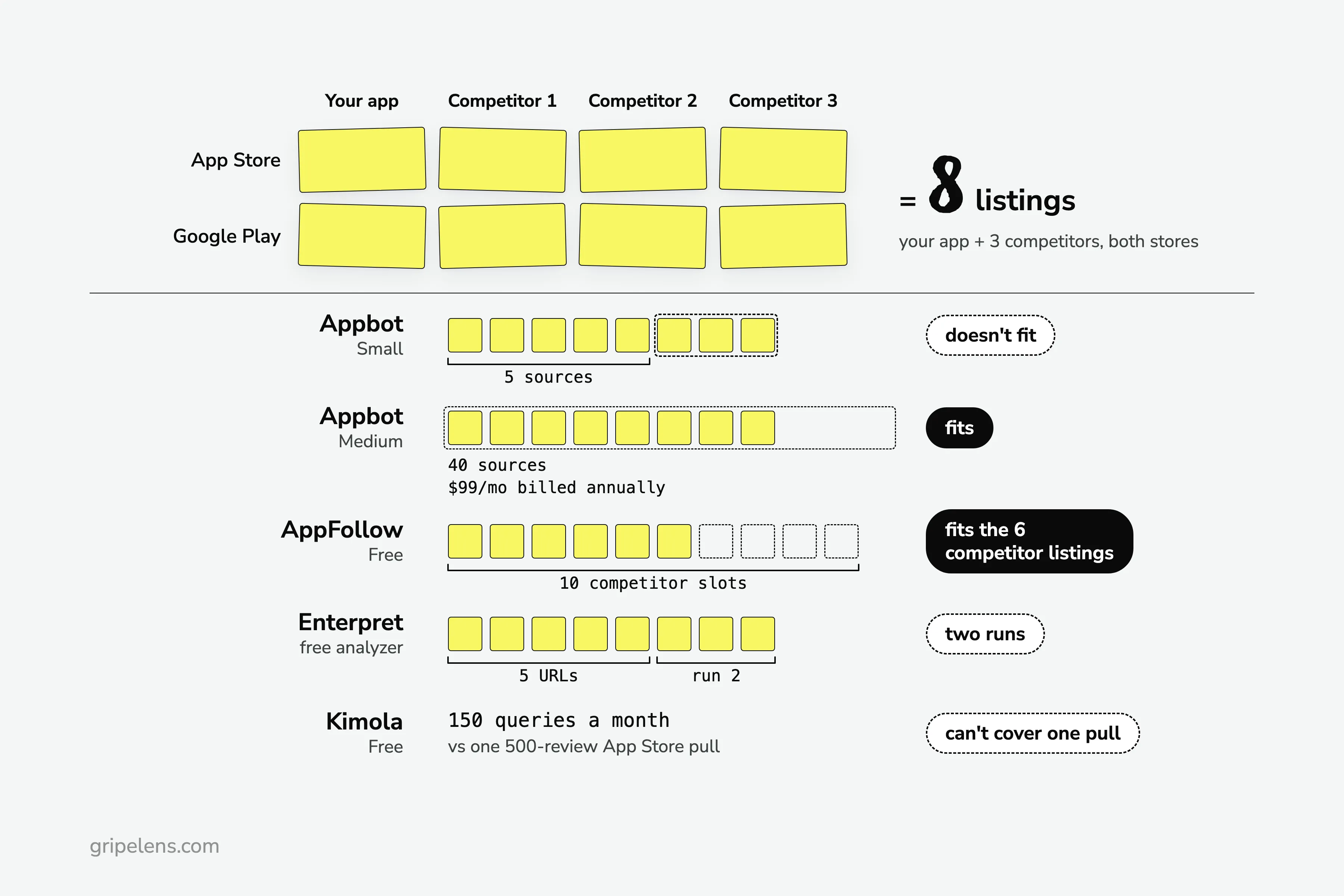
- Appbot’s Small plan holds 5 sources, so you’re on Medium (40 sources, $99 a month billed annually).
- AppFollow Free has 10 competitor slots, enough for the 6 competitor listings.
- Enterpret’s analyzer takes 5 URLs, so it’s two runs.
- Kimola’s free 150 queries can’t cover one 500-review App Store pull.
Then pick by situation:
- Zero budget, reading competitors before you build: the free route or AppFollow Free, plus Enterpret’s analyzer for a quick look at 5 listings.
- Your own app has review volume and needs replies and alerts across countries, and you want competitor reviews too: AppFollow, or Appbot from Large for Ask Appbot and auto replies.
- Competitor apps’ full history on both stores, tracked over time: Appbot, after you count your sources.
- Competitors reviewed outside the stores too: Kimola.
- You want the competitors found and every theme counted and dated: Gripelens (its section above has the trade-offs).
Whichever you pick, ask it for the base. A theme without “n of N” is a guess with a chart on top.
If You Want the Counting Done for You
If you want the competitor apps found for you and their reviews counted and dated, get early access: launch pricing is locked for a year for the first wave.
Get early access. If you’d rather keep the spreadsheet, the four checks above work with any tool.
FAQ
What Is the Best App Review App?
For your own app, the free ones: App Store Connect and Play Console show your reviews, and at low volume that’s enough. For competitor apps, Appbot if you want their full review history on both stores, or AppFollow’s free plan if you have no budget (10 competitor slots; the plan keeps 7 days of history).
Can I See the Reviews of an App I Don’t Own?
Yes. Store reviews are public and listed per country storefront. App Store Connect and Play Console won’t show them, because they cover the apps in your account (Play compares you with your category, nothing more). Use Appbot, AppFollow, Kimola or Enterpret’s free analyzer, or pull Apple’s public review feed yourself, one storefront at a time.
How Much Does an App Review Analysis Tool Cost?
Appbot starts at $49 a month billed annually, with no free plan (read 2026-11-02). AppFollow is free for 2 apps and 10 competitors, and its ASO plan is $19 a month billed annually (read 2026-11-02). Kimola is free for 150 queries a month, then £32 a month billed annually for Basic (read 2026-10-30). Enterpret’s App Review Analyzer is free, and its paid product is demo only (read 2026-11-03). Gripelens prices are on its pricing page. Check each page before you buy.
Can ChatGPT Analyze App Store Reviews for Me?
It can sort a batch of reviews you paste into themes, but it only reads what you paste, so the sample is whatever you collected. Count each theme yourself, keep the date and link next to every quote, and check the quotes against the reviews. Tone is a known trap: one developer asked a review-analyzer builder, “How does the AI handle the really sarcastic reviews?”